
Here in This post . I Explain you how one can use Ajax toolkit method(connection.js) to call a controller method via cutom or standard button in salesforce .
Before Dive into the functionality we will learn about Ajax Toolkit
The AJAX Toolkit is a JavaScript wrapper around the API so what does it mean ? It means that AJAX toolkit has some predefined classes in which you can access salesforce API.Because previousaly we don’t have any visual force pages,and this was the library used in S-controls. To use the predefine object/methods we need to include the below scripts i.e. connection.js and apex.js
To call a controller method via cutom or standard button in salesforce . we need to include ajax toolkit using javascript . by using ajax toolkit you can call your controller method
To achieve This functionality we perform the below steps:
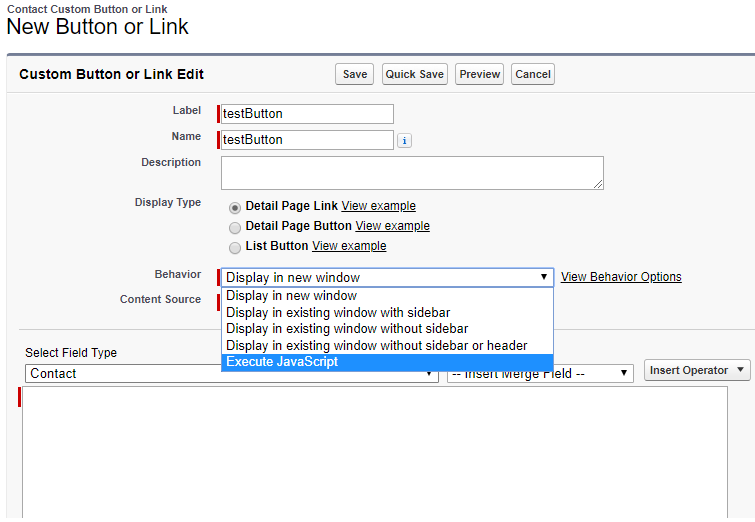
- We create a custom button on contact detail page by clicking on ‘New Button or Link’ section on object detail page
- Then we select Behaviour of button as : Execute java Scritpt here is the screenshot

3. Now we include connection.js and apex.js in our javascipt
{!REQUIRESCRIPT("/soap/ajax/29.0/connection.js")}
{!REQUIRESCRIPT("/soap/ajax/29.0/apex.js")}

//you can pass contact id in parameter
var cnnId='{!Contact.Id}'

// here we are calling our apex controller method using sForce.apex.execute

var result = sforce.apex.execute("yourControllerclass","ControllerMethod",Parameter);

// result returns either our call is succeed or not . result is a boolean variable
if ( result == 'True'){
txt="Contacts Updated Successfully.\n\n";
txt+="Click OK to continue.\n\n";
alert(txt);
} else {
txt="There was an error on this page.\n\n";
txt+="Click OK to continue.\n\n";
alert(txt);
}
// after performing action we reload our page
window.location.reload();
here is the Screenshot

4) Controller Class : Controller from which you want to call method for further operations
global class yourcontrollerClass{

// we need to add webservice keyword before method  we are calling from javascript
    webservice static string controllerMethod(String contactid)
    {
        contact thiscontact = [select id,Client__c,accountid from contact where id =: contactid];


        if(thiscontact != null)
        {
            for(contact contact:contacts){
                contact.Lead_Status__c = 'Not The DM';
            }
            update contacts;
        }
        if(contacts != null)
            return 'True';
        else
            return 'False';
    }
}
Views: 0